
Cursor
The best way to code with AI
What is Cursor?
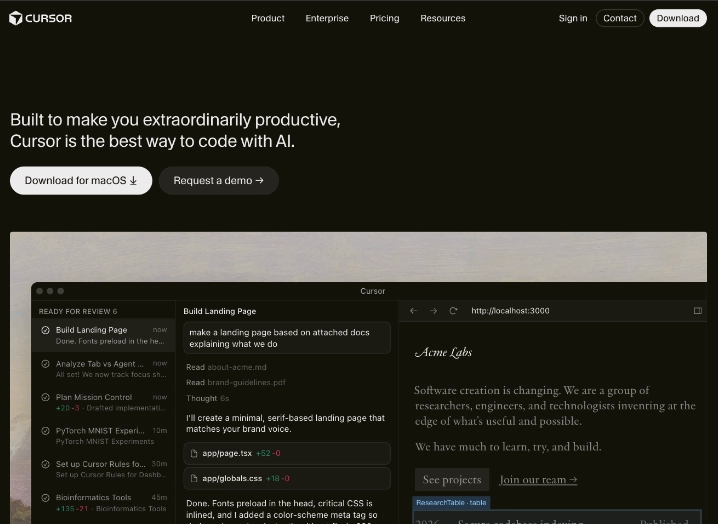
Developers working on ambitious projects frequently hit walls when switching between their editor, documentation, and separate AI tools. Cursor changes that dynamic as a dedicated AI code editor built as a fork of VS Code. It brings powerful language models straight into the development environment so that suggestions, edits, and entire workflows happen without leaving the IDE.
This tool falls into the coding and development category, but it stands out by shifting from simple autocomplete to agent-driven programming. Instead of just helping with snippets, it enables AI to plan, build, test, and iterate on features while understanding the entire codebase.
What does Cursor offer?
The experience begins with familiar VS Code layouts and shortcuts, which lowers the barrier for existing users. Once inside, the real difference appears through features like Tab for predictive completions that consider project context at scale and Cmd+K for precise, targeted changes. The Composer tool takes this further by letting users describe a feature in plain language and then watching the AI outline steps before executing multi-file modifications automatically.
Beyond single-file work, the platform supports agentic modes where AI handles end-to-end tasks such as debugging across modules or deploying updates. Secure indexing of large repositories ensures that queries about architecture or dependencies return accurate, context-rich answers. Users can also switch between leading models from OpenAI, Anthropic, or others, depending on the task at hand, and integrations with terminals, Slack, and GitHub extend the workflow outside the editor.
Teams adopt Cursor when they want to move faster without sacrificing control. The combination of deep codebase awareness and autonomous execution reduces repetitive manual work while keeping the developer in the driver’s seat for final decisions.
Best use cases
Cursor delivers the biggest impact on projects that involve scale, iteration, or cross-file complexity. Key scenarios include:
– Rapid prototyping of new features by describing requirements and letting agents generate, refine, and connect components across multiple files
– Large-scale refactoring where semantic search and Composer update logic are consistently applied throughout an entire repository
– Debugging and optimizing complex systems by querying the full codebase and receiving step-by-step explanations with suggested fixes
– Building interactive dashboards or full-stack applications from high-level prompts that include data sources and UI specifications
– Collaborative development in teams where AI assists with PR reviews, changelog updates, or onboarding new engineers through natural-language interactions
Who is Cursor best for?
Professional software engineers and development teams working on production codebases gain the most from Cursor. Full-time developers at startups or enterprises use it daily to maintain velocity on large projects, while technical leads appreciate the agent capabilities for standardizing patterns across the team. Companies already familiar with VS Code find the transition seamless and the productivity lift immediate.
It proves less suitable for absolute beginners still learning programming fundamentals or for solo hobbyists who code only occasionally and prefer lighter tools. Users who rely heavily on highly specialized niche editors or offline-only environments may also encounter friction during the initial setup.
Final verdict
Cursor has established itself as a serious contender in AI-assisted development by turning the code editor into an active collaborator capable of handling sophisticated, multi-step work. Its standout advantage comes from the tight integration of codebase-wide intelligence with practical agent tools that accelerate real-world engineering tasks. The chief limitation lies in the usage quotas on lower plans, which can constrain heavy daily sessions until teams move to Pro or higher tiers. It fits best with experienced developers and organizations that treat coding speed and codebase consistency as competitive priorities.
- Tab Autocomplete: Delivers highly accurate code predictions informed by full repository context and project patterns.
- Composer Mode: Plans and applies coordinated changes across multiple files based on natural language descriptions.
- Agentic Development: Deploys autonomous AI agents to complete end-to-end tasks including testing and deployment steps.
- Semantic Codebase Search: Indexes entire projects for precise answers to architecture or dependency questions.
- Multi-Model Selection: Switches between leading models from OpenAI, Anthropic, Gemini, and others for optimal task performance.
Pros
- Maintains complete awareness of large codebases so suggestions remain relevant even in complex architectures
- Enables parallel agent execution that turns high-level ideas into working features with minimal manual intervention
- Preserves the familiar VS Code interface and extensions while layering advanced AI capabilities on top
Cons
- Request limits on free and entry-level plans can restrict intensive use during peak development sprints
- Advanced agent features require time to master for users accustomed to simpler autocomplete tools

